Professional LMS
For training teams organising courses and role-based curricula, and learners returning to their assigned learning. Review course progress, certificates, and assignment activity.
Explore training managementMETEOR LEARN · PROFESSIONAL LMS & GAMIFY
Help people find their courses, continue learning, and keep completion records within reach. The professional LMS brings the course library, role-based learning paths, certificates, and reports together. Gamify offers a separate experience for interactive course authoring and delivery.
TWO DIFFERENT LEARNING NEEDS
Choose the starting point that matches the work. Professional LMS administration and Gamify authoring are described separately so you can evaluate the relevant experience.
For training teams organising courses and role-based curricula, and learners returning to their assigned learning. Review course progress, certificates, and assignment activity.
Explore training managementFor authors building interactive lessons and knowledge checks. Organise modules, choose activities, review draft content, and present the course in a themed learner experience.
Explore GamifyPROFESSIONAL LMS
Learners need to know where to begin and what remains. Training owners need a way to organise the curriculum and review activity. Each part of the LMS serves a different task.
A learner should not have to search for where they stopped.
My Journey brings the current course and its progress into the learner’s dashboard, alongside certificates and achievements. Learners can return to their course from the same starting point.
A list of files does not explain what to study next.
Search the library and switch between the full catalogue and enrolled or in-progress courses. Course cards show the subject, modules, duration, and a Start or Resume action.
Onboarding and role development need an order, not just a catalogue.
Build a learning path with a target role, level, and curriculum sequence. The path view provides actions to inspect the roadmap, edit the track, and assign it to roles.
Learners need a place to find the credentials already issued to them.
The certificates area separates issued and upcoming certificates, with search by course, code, or status and an action to view an issued record.
Managers need to see unfinished work as well as completed learning.
Learning reports bring course status, assignment activity, completion, and overdue counts together. Use the view to identify which part of the training programme needs a closer review.
Recognition is more useful when learners understand what earns it.
The badges area shows milestones for course completion, assessments, learning consistency, and colleague recognition. Each badge presents its criteria and progress toward the next milestone.
PROFESSIONAL LMS APPLICATION VIEWS
Explore the learner dashboard, searchable course library, and reporting view. Figures shown belong to the example account.
Meteor Learn · Dashboard
The My Journey dashboard brings a course in progress, learning progress, certificates, and achievements into one view. Figures shown belong to this example account.
Open full-size view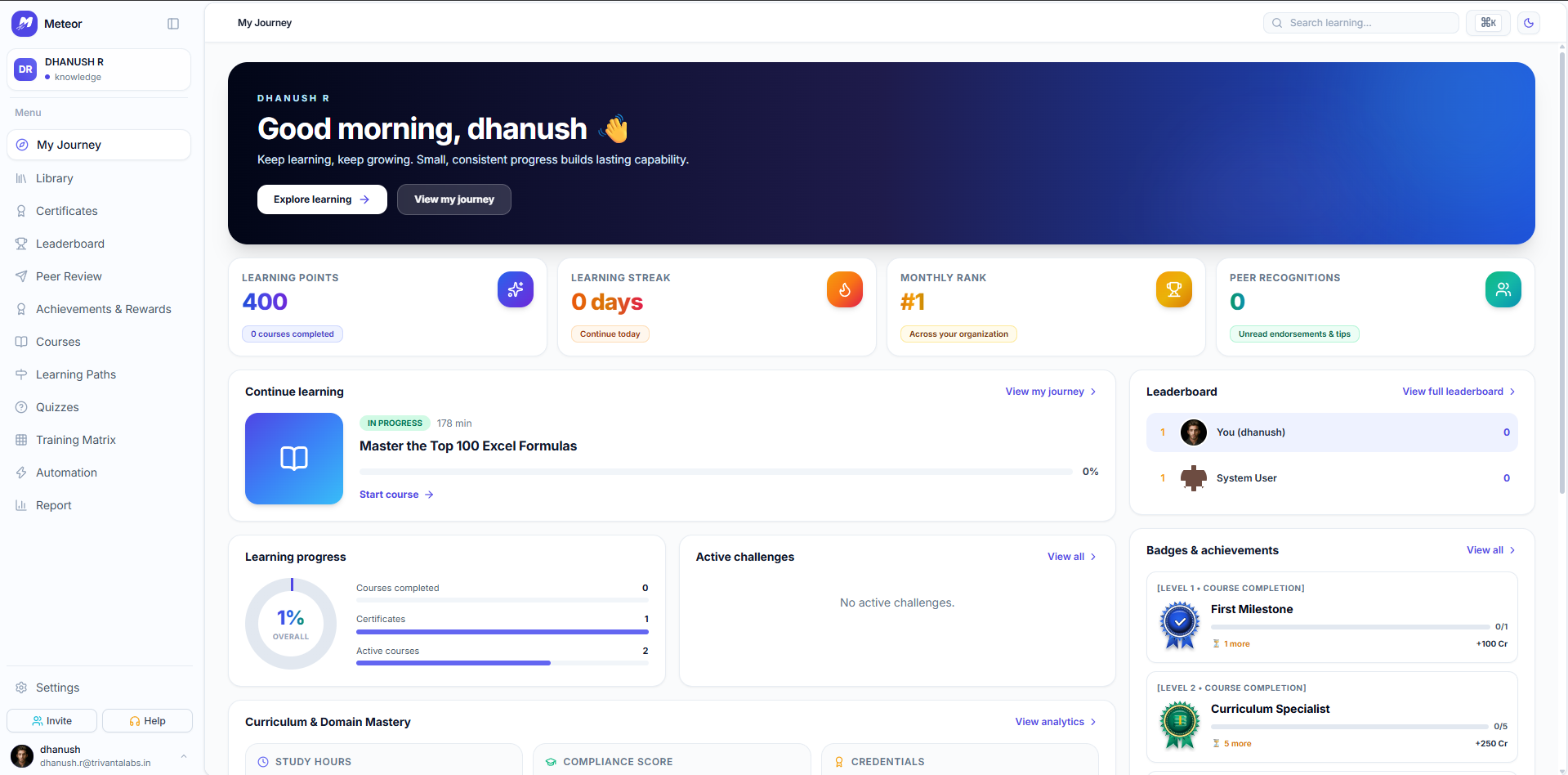
GAMIFY · AUTHORING & INTERACTIVE DELIVERY
A concept comparison, a guided activity, and a quiz serve different purposes. The authoring studio gives course creators a curriculum structure and activity templates, while the learner view provides lesson controls and result feedback.
A useful course starts with a defined subject and learner.
The course-generation form captures the title, topic, audience, difficulty, description, and learning objectives. Treat generated content as a draft to review before publication.
Reading, practising, and checking understanding are different tasks.
The slide editor organises modules and lessons, with templates for concept comparisons, hotspots, quizzes, guided labs, branching scenarios, recall cards, and other learning activities.
Existing authoring work should have a defined route into the studio.
The importer provides separate schemas for a course and a multi-course learning path. Upload or paste the supported JSON structure and choose a draft or published starting state.
A learning path should not lead to a course that is still a draft.
The path creator arranges selected courses into a track and flags unpublished courses before the path can be published. Authors can save the track as a draft while content is reviewed.
Learners need a way to revisit a concept at their own pace.
The lesson view combines the content with previous/next slide navigation, narration controls, playback speed, and a learning companion within the themed experience.
A quiz should explain the result and the next step.
The result view shows the score, correct and incorrect answer counts, and a Continue action. Points and streaks are part of the Gamify experience, separate from the professional LMS workflow.
GAMIFY APPLICATION VIEWS
The themed lesson and quiz below belong to Gamify, separate from the professional LMS dashboard and reports above.
Gamify · Interactive lesson
The Gamify experience presents a concept lesson with slide navigation, narration controls, and a learning companion.
Open full-size view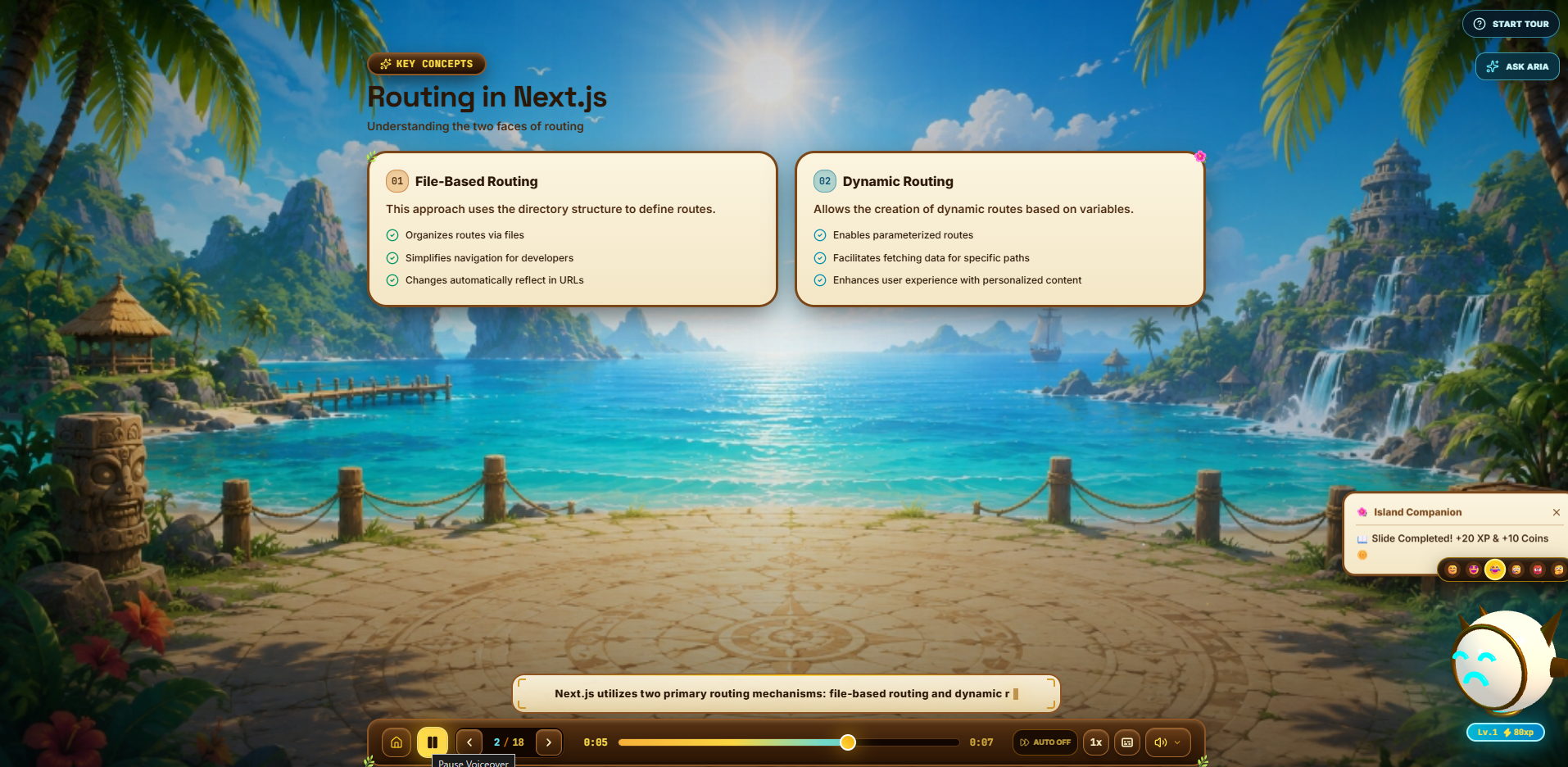
EXAMPLE REQUIREMENT · ROLE-BASED ONBOARDING
Identify the courses and their order for the role. Review the learning-path structure and assignment requirements.
Use the library and My Journey view to find a course, continue it, and review progress.
Check assignment activity and outstanding training in the report view. Review issued certificates where the programme uses them.
They are distinct experiences. The professional LMS focuses on the course library, role-based learning paths, learner progress, certificates, and reports. Gamify focuses on course authoring, interactive lessons, themed delivery, and knowledge checks.
The professional LMS learning-path view shows a target role and an ordered course sequence, with assignment controls. Bring a sample role and curriculum to review the required setup.
The learning report presents course status, assignment activity, completion, and overdue counts. Confirm the reporting scope, audience access, and any export needs for your programme.
Gamify includes a course-generation input form and draft/published states. Authors should review subject accuracy, objectives, examples, and assessment questions before publishing. Generation quality is not established by a screenshot.
The professional LMS has matrix and automation configuration views. Review your rules, required records, permissions, and representative cases in a walkthrough. Regulatory suitability requires a separate assessment.
CONFIRM THE RIGHT SCOPE
Share the audience, course material, roles, reporting needs, and whether you need professional LMS, Gamify, or both. Confirm availability, configuration, pricing, and any integration work for that scope.