
THE METEOR PRODUCT SUITE

Find the right product
for the work ahead.

Signing requests, team learning, and quality processes each need a clear approach. Start with the product that matches your team’s work.

Illustration of a signing document, a learning workbook, and quality review records
Signing · Learning management · Quality managementProduct illustration

THREE FOCUSED PRODUCTS

Start with your team’s priority.

Compare the purpose and typical use of each product before exploring the details.

DIGITAL SIGNING

Meteor Sign

Prepare the request. Follow each signature.

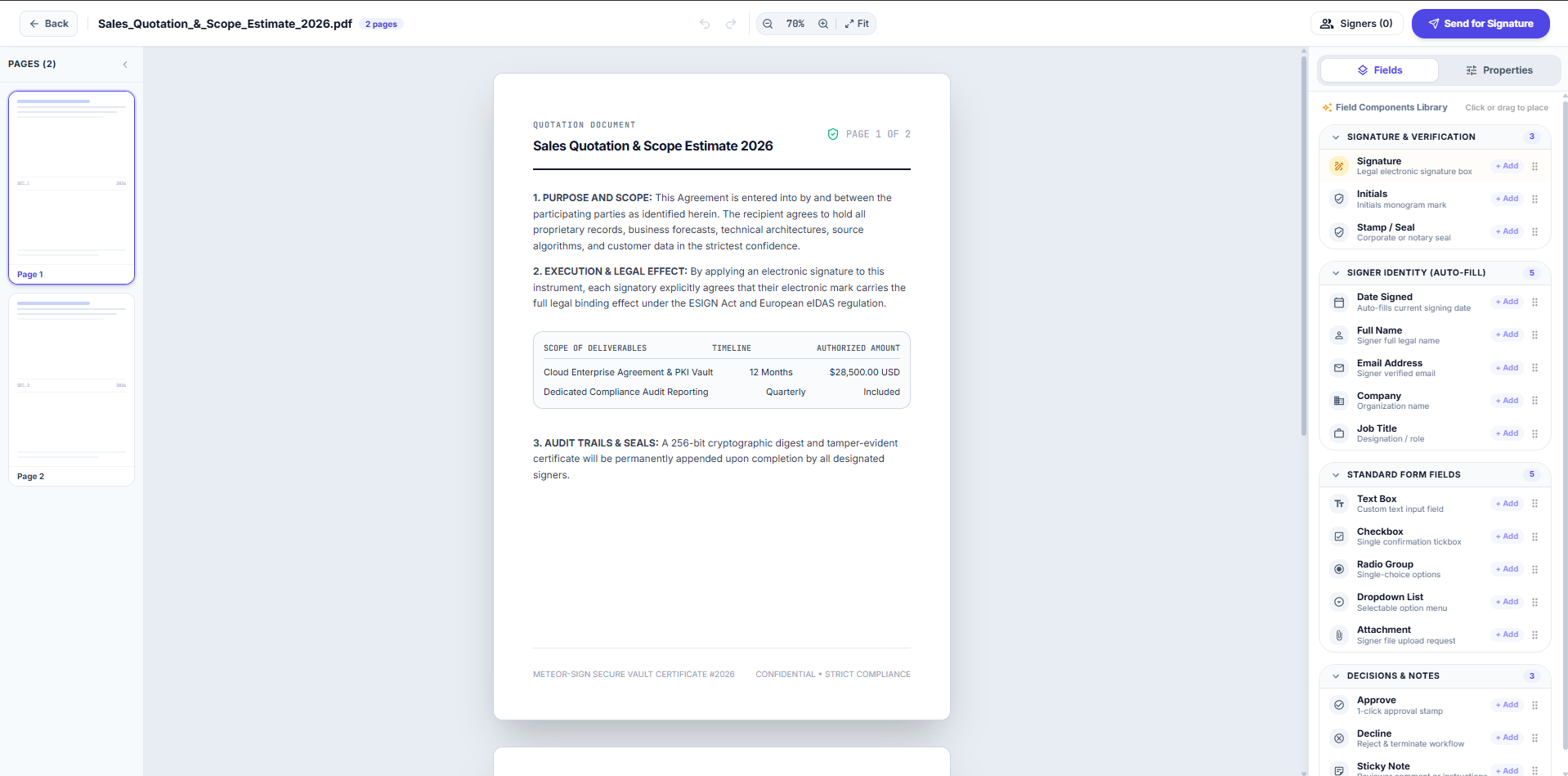
Reuse a document template, place the signature and form fields it needs, and keep requests waiting on recipients separate from your own signing tasks.

WHO IT’S FOR

HR, sales, and operations teams

See where it fits
LEARNING MANAGEMENT

Meteor Learn

Give learners a course. Give managers a follow-up view.

Help learners search the course library and return to training in progress. Organise role-based curricula, keep issued certificates accessible, and review assignment activity.

WHO IT’S FOR

Learning teams, managers, and trainers

See where it fits
QUALITY MANAGEMENT

Meteor QMS

Make quality work easier to organise.

For teams evaluating how to organise document reviews, quality issues, and supporting records. Confirm the available scope in a walkthrough.

WHO IT’S FOR

Quality teams and process owners

See where it fits

01 / DIGITAL SIGNING

Prepare the request. Follow each signature.

Reuse a document template, place the signature and form fields it needs, and keep requests waiting on recipients separate from your own signing tasks.

EXAMPLE USE CASE

An HR team preparing an offer letter from a reusable template and following the recipient’s signing progress.

What the workflow brings together

  • Signature, initial, date, text, checkbox, and attachment fields
  • Reusable templates and recipient progress
  • Needs My Signature, Waiting on Others, and completed files

02 / LEARNING MANAGEMENT

Give learners a course. Give managers a follow-up view.

Help learners search the course library and return to training in progress. Organise role-based curricula, keep issued certificates accessible, and review assignment activity.

EXAMPLE USE CASE

A new starter following an ordered curriculum for their role while a training owner reviews outstanding assignments.

What the workflow brings together

  • Searchable courses with Start and Resume actions
  • Role-based learning paths and issued certificates
  • Course status, assignment activity, and overdue training

03 / QUALITY MANAGEMENT

Make quality work easier to organise.

For teams evaluating how to organise document reviews, quality issues, and supporting records. Confirm the available scope in a walkthrough.

EXAMPLE USE CASE

A procedure change that needs review, approval, and a retained record.

Requirements to review

  • Document control and review processes
  • Quality issues and corrective actions
  • Audit preparation and supporting evidence

INSIDE THE APPLICATIONS

Look beyond the feature list.

Explore document preparation and the professional LMS through actual application screens.

Four application views. Select a view to keep it on screen.

Meteor Sign · Document preparation

Place the fields a document needs.

The document editor shows page thumbnails and a field library for signatures, initials, dates, text, checkboxes, and attachments.

Open full-size view
Meteor Sign document editor with page thumbnails, a sample quotation, and the signature and form-field library
Meteor Sign · Sample document shown

MAKE AN INFORMED CHOICE

Check the fit before you commit.

A useful product conversation starts with your process and the requirements that matter to your team.

01

Bring a real example

Use a sample agreement, training plan, or quality procedure to explain your current process.

02

Review your requirements

Discuss roles, reporting, accessibility, data handling, and any systems you need to connect.

03

Confirm the proposed scope

Ask which capabilities are available, what needs configuration, and what would require additional work.

NEED HELP CHOOSING?

Tell us about the work you need to improve.

Share your current process and the outcome you need. We can discuss the relevant product and your requirements.

Talk to our team